How to add a supplier
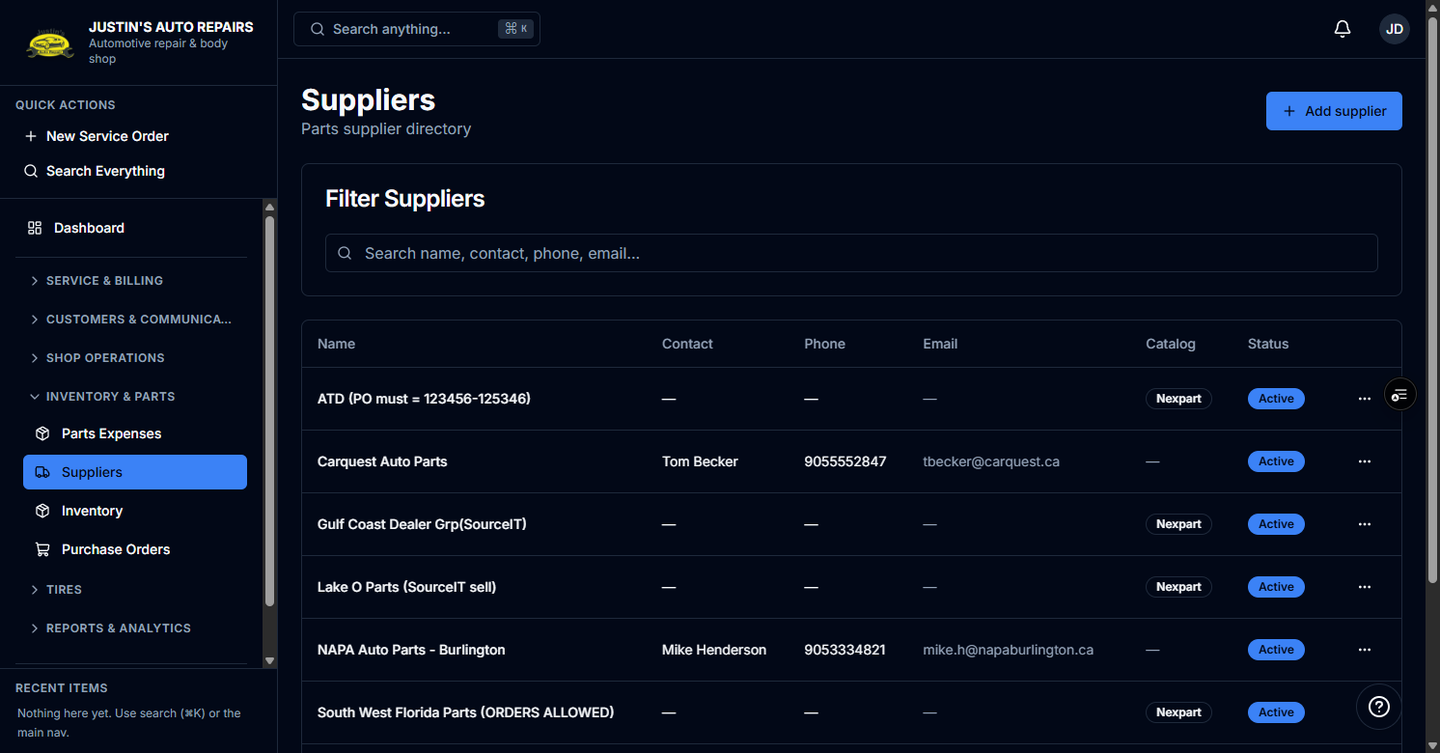
Who this is for
You add a vendor you buy parts from, so purchase orders and supplier invoices can name them.
Before you start
- Owners and managers see Suppliers and can add or edit. Receptionists and accountants can pick a supplier on an invoice but do not get the Suppliers item. Technicians cannot.
- A catalog order can create a supplier for you. You add one here when you buy outside the catalog.
Steps
- Open Suppliers.
- Choose Add supplier.
- Enter the name. Name is required.
- Enter the contact name, email, and phone if you have them.
- Choose Save.
How you know it worked
The vendor is in the Suppliers list. You can choose them on a new purchase order and on a parts expense. A catalog-linked vendor shows a Catalog badge.
Common snags
- Importing a catalog cart creates a supplier when that seller is new, using the network's name as-is. NAPA (Downtown) and NAPA (Commercial) stay separate.
- If you already typed the vendor and the catalog creates a second row, open the one you want to keep, set the catalog account id under Parts catalog ordering, and deactivate the extra row.
- Deactivate hides a vendor you no longer buy from. Lines already pointed at them stay on the job.