How to start as an accountant
Who this is for
The person posting invoices, payments, and supplier invoices. You get Accounting and, when export is on, Data Export. You do not add customers or estimates, and you do not run the shop from Service Orders.
Before you start
- Sign in with the email the owner invited. See How to sign in.
- Your role badge on Profile should say ACCOUNTANT. The owner sets that under User Management.
Steps
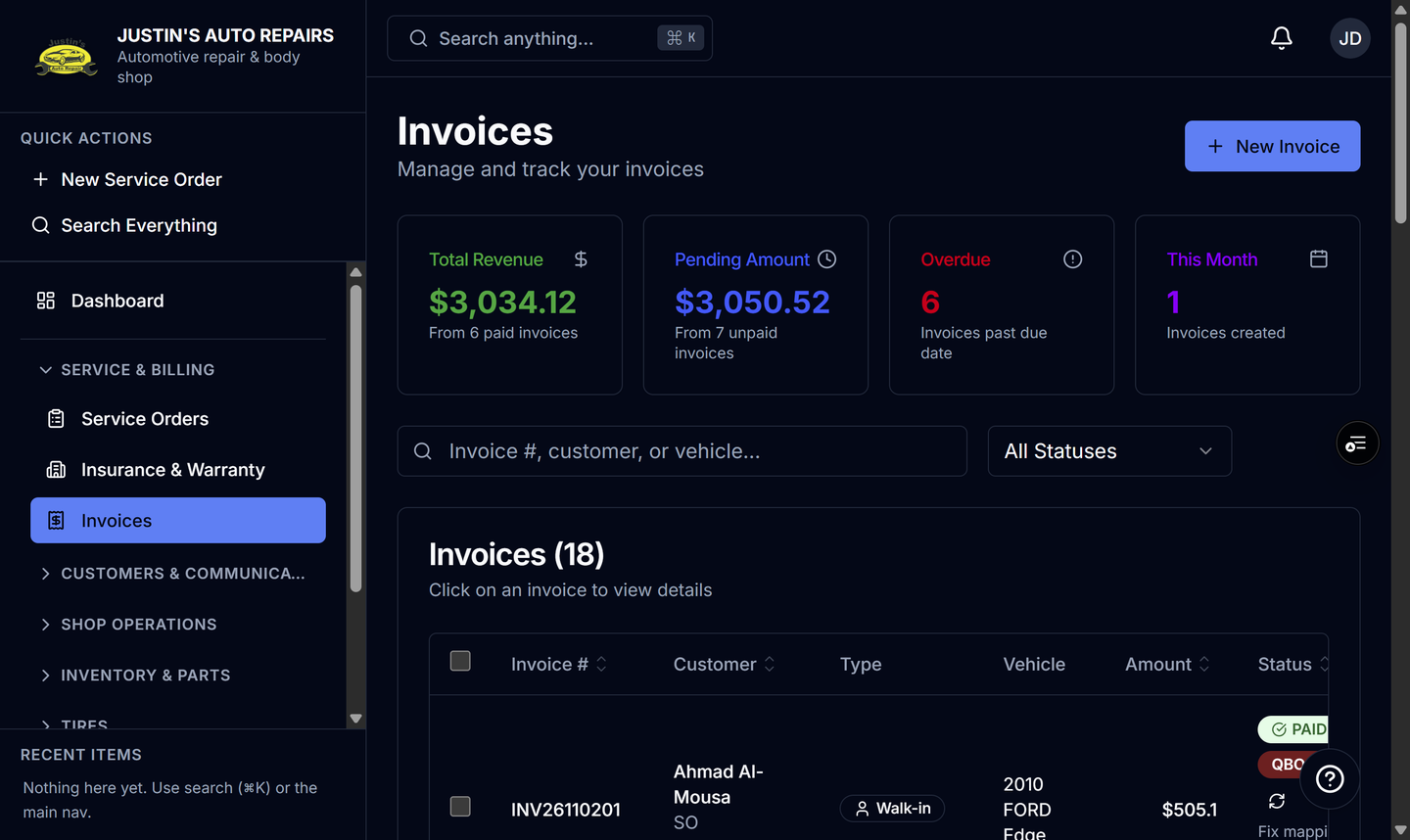
- Open Service & billing and choose Invoices.
- Open an invoice to record a payment or check what is still unpaid. See How to create an invoice.
- Open Inventory & Parts and choose Parts Expenses for supplier invoices. You can record and edit them. Deleting one is limited to a manager or the owner.
- Open Reports & Analytics and choose Accounting.
- Choose Data Export on that same group when the item is there. The page is titled Data Export and lists Excel downloads.
How you know it worked
Invoices is open. Accounting is in the sidebar. Customers, Vehicles, and Service Orders are not. Search can find customers, service orders, and invoices, and it skips vehicles and parts.
Common snags
- Suppliers is not on your menu. You can still pick a supplier while recording a parts expense.
- Data Export is hidden when that module is off. See How to see why a menu is missing.
- You do not see Total Revenue, P&L, or company settings.