How to manage users
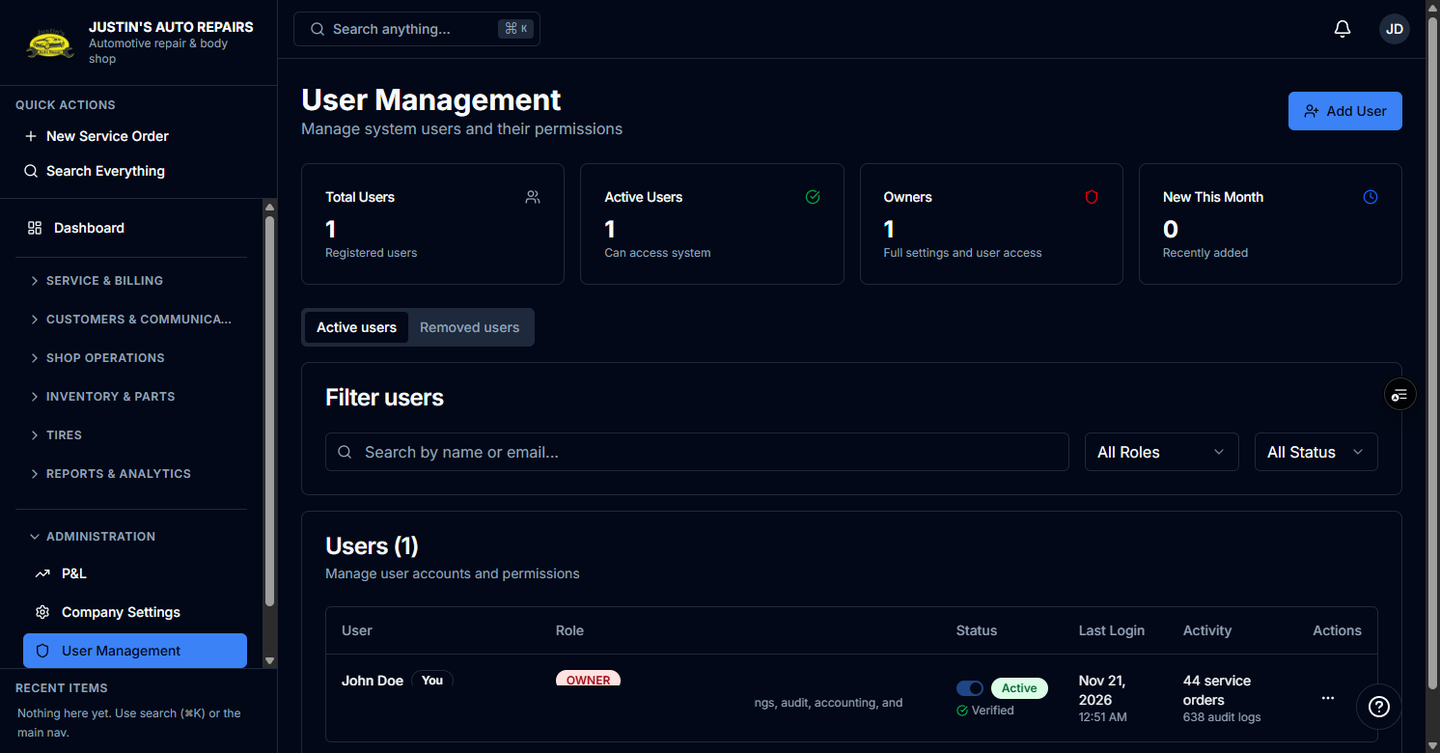
Who this is for
You are the owner of this shop adding people who work here. This page lists users in your shop only.
Before you start
- You need the person's name and email. They sign in with Microsoft using that same email. BayOps does not invent a password for them.
- Roles are Owner, Manager, Receptionist, Technician, and Accountant. A person's role is for this shop.
Steps
- Open Administration in the sidebar.
- Choose User Management.
- Choose Add User.
- Enter the name and email.
- Choose a role and leave the user active.
- Choose Create user.
- If the invitation does not arrive, open the row menu and choose Send invitation email.
How you know it worked
The person appears in the user list with the role you chose, and they receive an invitation email for that address.
Common snags
- User Management is missing. Only the owner manages users.
- Create succeeds and the person still cannot sign in. Send the invite again from their row, and confirm the email matches the invitation exactly.
- You removed someone by mistake. Open the Removed users tab and choose Restore. An owner can restore within 72 hours, and only if that email is not already used by another active user in the shop.