How to export or back up data
Who this is for
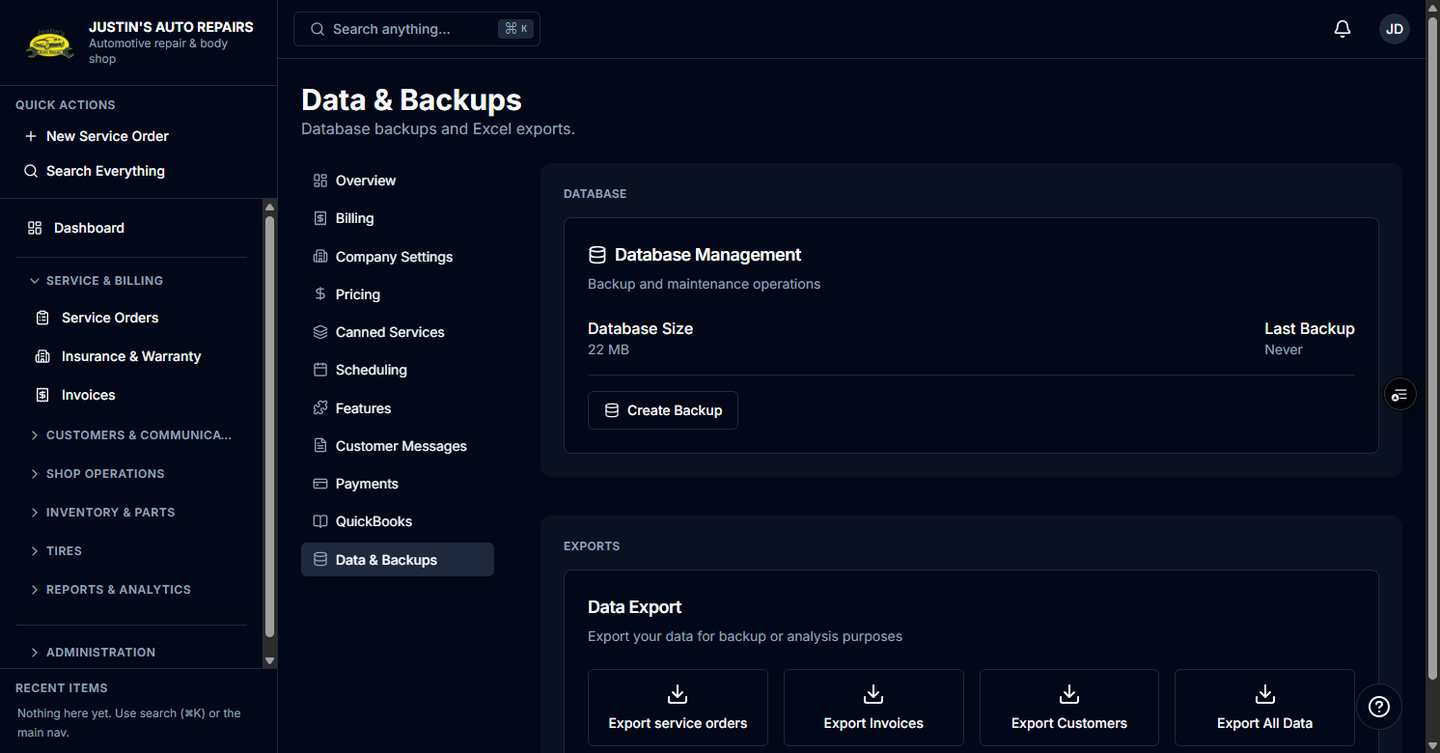
You are the owner opening Data & backups, or the accountant opening the export buttons. Excel downloads are the same files as Export shop data. The database backup button is on the owner's page.
Before you start
- Excel export needs the data export module. The backup action is separate and is shown to the owner.
- An accountant who opens Settings sees Data Export and does not see the backup card.
Steps
- Open Settings.
- If you are the owner, choose Data & Backups.
- If you are the owner, under Database, read Last Backup.
- Choose Create Backup.
- In the dialog, choose Create Backup again.
- For a spreadsheet, follow Export shop data. Accountants use the Data Export buttons on the page Settings opened for them.
How you know it worked
A toast says Backup Created, and Last Backup shows today's date after the page refreshes. An export downloads an .xlsx file.
Common snags
- Create Backup fails. Try again. If it keeps failing, contact BayOps support. The Excel export can still work.
- Export buttons are disabled and the card says Excel export is disabled. Contact BayOps support to enable the data export module.
- You are the accountant and there is no Data & Backups item. Use the Data Export buttons on the page Settings opened for you, described in Export shop data.